7.9 Parallel Observations
7.9.1 Parallel Observing
Parallel observing allows HST to operate several other instruments while the prime instrument is executing its observations. While the primary instrument observes a fixed target at user-specified coordinates, the parallel instrument observes at coordinates 5 to 10 arcminutes away, depending on the parallel instrument. The HST field of view following SM4 (Figure 3.1) shows the general locations of the instrument apertures adjacent to one another on the sky. Accurate relative positions for all instruments can be found on STScI's Observatory Web page in the Pointing section.
The recommended method of determining the field of view for any instrument is to use APT. A Digital Sky Survey (or user supplied) image of the primary target area is displayed with an HST field of view overlay. Any desired coordinate and ORIENT combination for the primary target will then display the possible pointings of any instrument operated in parallel. If the primary exposure will execute at a known (absolute) orientation, APT will display the exact field of view for any instrument executed in parallel. If the primary exposure will execute at a random (nominal) orient or range of orient values, APT allows the HST field of view to be rotated interactively about the primary pointing. APT can be a valuable resource for parallel observing programs, especially those designed for, or restricted to specific pointings for the parallel FOV.
Certain operating limits are in place to restrict use of configurations, modes, parameters, elements, and requirements allowed for each instrument while used in parallel. Details on these limits are documented in the Call for Proposals and Primer. General information on ACS specific parallel operations are documented in the following sections for each of the three types of ACS parallel observing: coordinated, auto, and pure.
ACS Coordinated Parallels
Coordinated parallel observations are specified in the same Phase II observing program as the primary observations via the prime and parallel group containers in APT. A single ACS channel may be used for a coordinated parallel observation, with, and only with, another instrument. Unlike NICMOS, coordinated parallels cannot be used to operate any of the ACS channels simultaneously. ACS exposures may not be used as both the prime and parallel exposures within the same parallel container. In order to operate ACS channels simultaneously, the use of ACS auto-parallels is described in the following section.
In order to protect the ACS SBC detector from inadvertent over illumination, the ACS/SBC configuration may be used as a coordinated parallel only if an exact spacecraft orientation (ORIENTation) is specified, the coordinates of the parallel field are determined, and the parallel target or field passes the same bright-object screening applied to SBC primary observations. The APT will greatly assist in defining this type of ACS parallel program.
It is expected that users will frequently wish to employ ACS and WFC3 in parallel. Because users will also generally want to dither their observations, exposures of these two cameras will generally be taken synchronously. However, both ACS and WFC3 images must first be loaded into and then transferred from the camera buffers to the solid state data recorders (SSDRs). The ACS buffer can only hold one image, while the WFC3 can hold two optical images (and roughly the same number of NIR images, as each NIR image is expected to use multiple reads). However images from these cameras cannot be transferred to the SSDRs simultaneously, and each transfer takes about 350 seconds. We presently expect that it will be possible to take at least three images per orbit in each of the two cameras, and four exposures per orbit may also be feasible. Members of the ACS and WFC3 teams are actively pursuing this question, and more detailed information on planning parallel ACS and WFC3 observations will be made available to the community before the Cycle 17 proposal deadline.
ACS Auto-Parallels
The ACS auto-parallel capability is intended to increase the scientific return of the instrument by adding exposures with the parallel detector while interfering as little as possible with the observer's primary program. When either the WFC or HRC is the primary channel, and the exposure in that channel meets the requirements stated below, an auto-parallel observation will be automatically scheduled in the parallel channel during Phase II processing. Parallel detector exposures will be added automatically with the longest possible exposure time that does not interfere with the primary program. In order for an auto-parallel to be scheduled, the primary observation must meet the specifications that depend primarily on the exposure time and the filter selection of the primary exposure.
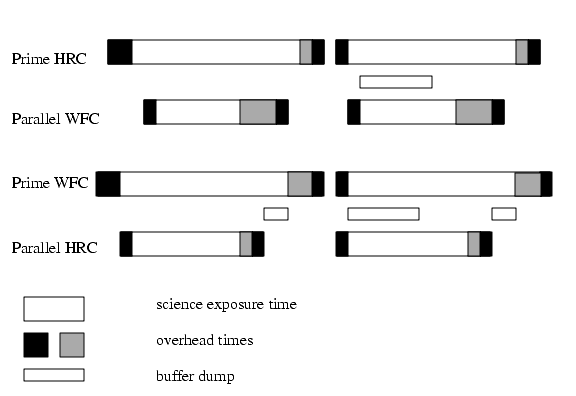
The user has three control options: This is done by selecting the PAREXP optional parameter. A user may either choose to explicitly add the auto-parallels by choosing PAREXP=MULTIPLE; choose to have no auto-parallels added by selecting PAREXP=NONE; or leave the special requirement set to the default, DEF. When DEF is selected, auto-parallels will be added according to the same primary exposure requirements as those for the MULTIPLE option. When MULTIPLE is selected an auto-parallel will be added for each CR-SPLIT part of the primary exposure (see Figure 7.10). There is a simple algorithm that the Phase II software follows in order to determine if an auto-parallel is feasible:
- The primary exposure must be for an external target, in ACCUM mode, and either in the WFC or HRC channel. It is not possible to observe simultaneously with the HRC and SBC since they share the same optical train up to the flip mirror. Simultaneous operation of the WFC and SBC is not supported.
- The primary exposure must be taken with a filter from the list of primary/auto-parallel filter combinations (Table 7.12). The WFC and HRC share the same filter wheels and their optical paths are not diametrically opposite each other. In addition, the filters in the filter wheel are not evenly spaced around the wheel. Therefore, only certain parallel/auto-parallel combinations are physically possible. If a filter does not appear in the table, an auto-parallel is not physically possible.
- The primary exposure time must be greater than the minimum exposure time, defined in Table 7.13. These values are calculated such that all of the commanding associated with the auto-parallel is scheduled during the exposure time of the primary CR-SPLIT portion.
- The primary exposure is not allowed to have any EXPAND, MIN DUR, MAX DUR, or RT ANALYSIS special requirements.
Table 7.12: Filter combinations for auto-parallels in the two cases of (i) HRC camera prime and (ii) WFC camera prime.Note that since the WFC and HRC apertures are not opposite each other on the filter wheels, filter pairs in columns 1 and 2 do not map to columns 3 and 4.Table 7.13: Minimum primary exposure time (seconds) to attach an auto-parallel for CR-SPLIT=n.
There are a few things to remember about auto-parallels:
- In order to avoid the addition of serial buffer dumps in the primary program, group short HRC exposures and long WFC exposures separately. It takes approximately 349 seconds to dump a WFC image from the buffer. When WFC is the parallel camera, this buffer dump can occur during the following exposure if its exposure time is greater than ~339 seconds, otherwise a serial buffer dump must be added. This can be avoided by scheduling long WFC full-frame exposures together.
- auto-parallels will not be assigned when the number of exposure iterations specified for the primary exposure is greater than one. It is assumed that the observer will use exposure iterations to obtain coarse time resolution. These exposures will in most cases be too short for auto-parallel observations.
The following policies will be in effect for Auto-Parallel observations:
- Auto-Parallel observations are the property of the PI of the program using the prime ACS detector.
- Auto-Parallel observations are not available for independent scheduling.
- There are some fairly severe timing constraints under which Auto-Parallel observations may be added. The scheduling system will add parallels only if it can do so without affecting the prime science.
- If WFC data are taken in parallel with prime HRC observations, the GAIN setting will be 2 (see Section 4.3). For HRC parallels added to prime WFC exposures the GAIN will be 2.
- WFC Auto-parallel observations are subject to compression of one quadrant at a level that can occasionally result in some data loss. Such observations will not be repeated.
ACS Pure Parallels
In ACS pure parallel observations, an observation is taken with ACS on an essentially random area of the sky while another instrument is making prime observations. No SBC pure parallels will be allowed due to bright object concerns.
Unlike the previous two types of parallel programs, pure parallels contain only parallel visits. Use of the GO/PAR proposal category will make any visit in the program a pure parallel.
The ACS default (archival) pure parallel program continued to execute for the community until midway through Cycle 13 when all of the "Default" HST archival pure parallel programs were discontinued to prolong the lifetime of transmitters on HST. This non-proprietary data came from programs 9575, 9584, and 9701. A list of all pure parallel datasets in the HST archive is at:
Observers can request ACS pure parallels; however, there are many constraints which can render pure parallels unselectable in any given orbit. Pure parallels will always be given lower priority than primaries, and are thus scheduled only on a non-interference basis. Users should consult the Call for Proposals for more information about pure parallel opportunities with ACS.
ACS Auto-Parallels with ACS Coordinated and ACS Pure Parallels
ACS auto-parallels can be added to ACS pure and ACS coordinated parallels by default if scheduling constraints allow. However auto-parallels cannot be added to observations that make use of EXPAND or MAX DUR special requirements. Therefore ACS pure parallels can either be crafted to expose for the maximum duration allowed in each individual orbit by using EXPAND/MAX DUR or have auto-parallels added, but not both.
|
Space telescope Science Institute http://www.stsci.edu |